




Enterprise AI agents are increasingly used to assist users across applications, from booking flights to managing approvals and generating dashboards. An AI agent for UI design takes this further by generating interactive layouts, forms, and controls that users can click and submit, instead of just returning plain text responses.
What is an AI agent for UI design?
An AI agent for UI design is a system that generates user interface structures dynamically, often using structured data formats rather than executable code to ensure security and cross-platform compatibility.
Once agents start creating interactive UI instead of just text, three concerns show up immediately: security, portability, and consistency.

Security is the obvious concern: you don’t want untrusted agents running code in your application. But there’s also portability to consider, since the same interface may need to run across web, mobile, or desktop platforms. And consistency matters too; interfaces must respect your design and brand, even when generated dynamically.
Traditional approaches don’t solve this well. Executing arbitrary code is unsafe. Limiting output to plain text is overly restrictive. Hardcoding forms for every scenario doesn’t scale. Picture an orchestrator agent that delegates to a remote travel booking agent. That booking agent needs to return a reservation form, but how do you render interactive UI from an untrusted source without exposing your app to injection attacks?
Approaches to AI agent UI design
A few projects try to solve this problem, each for different use cases:
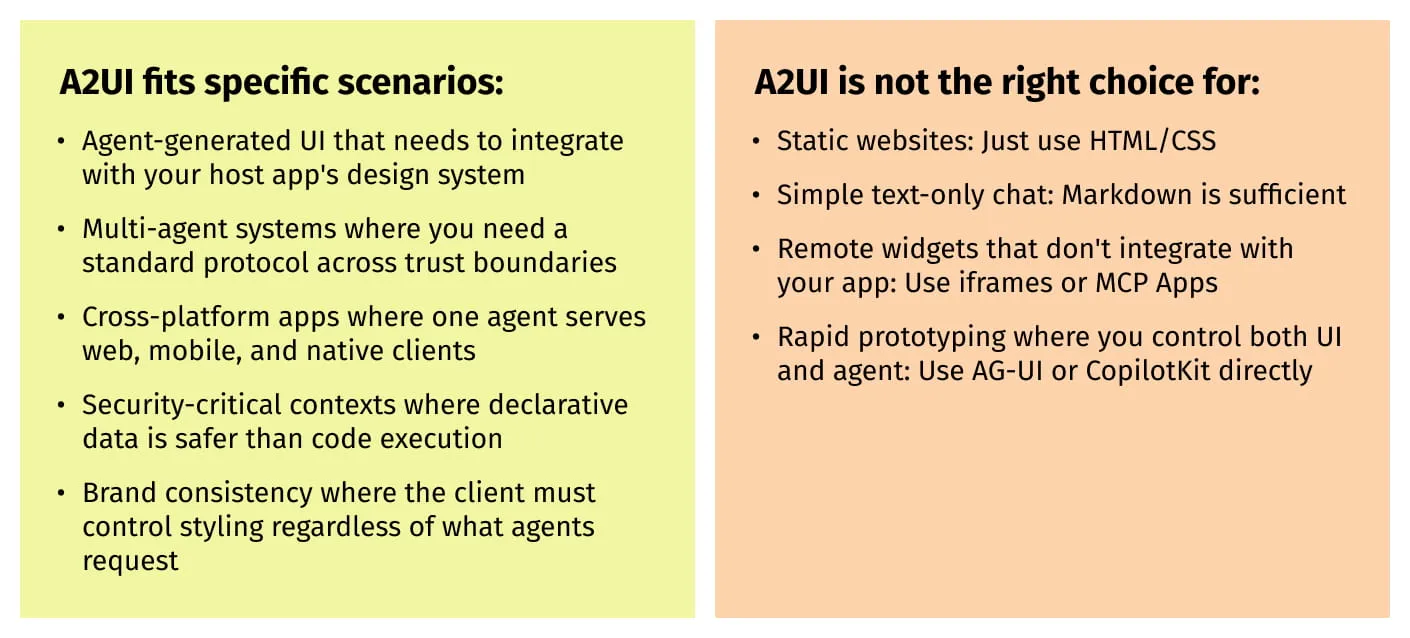
- MCP-UI / MCP Apps (Anthropic/OpenAI ecosystem) uses iframe sandboxing. Works well for remote widgets that don’t need integration with your host app’s design system.
- Vercel AI SDK / v0 generates actual React code. Powerful for web prototyping, but you’re executing LLM-generated code.
- AG-UI / CopilotKit are full-stack frameworks handling state sync, chat history, and input. Best when building a UI and agent together rapidly.
- A2UI (Google) is a lightweight protocol for cross-platform declarative UI. A good fit for multi-agent systems where you need safe rendering from agents you don’t control.
These aren’t always competing choices. A2UI is complementary to frameworks like AG-UI: you can build your host app with CopilotKit while using A2UI as the payload format for rendering responses from third-party agents. This gives you the best of both worlds: a rich, stateful host app that safely renders content from external agents.
What makes A2UI different
Instead of sandboxing web content or generating executable code, A2UI sends JSON blueprints that map to native components on any platform. A Flutter app, a web application, and a future SwiftUI client can all render the same payload using their own native widgets. The UI inherits the host app’s styling and accessibility features naturally.
This design pays off when:
- You need the same agent UI on mobile and desktop, not just web
- Iframe overhead or sandboxing restrictions don’t fit your architecture
- You want native performance with a platform-consistent look and feel
- Your orchestrator agent needs to understand UI payloads from sub-agents
That last point is significant for multi-agent systems. Because A2UI payloads are lightweight and semantic rather than opaque blobs, an orchestrator can inspect, modify, or route UI responses from sub-agents. That makes collaboration between agents more flexible than iframe-based approaches allow.
A2UI’s core philosophy is to be “safe like data, but expressive like code.” The AI UI design agent describes what it wants to show, and the client decides how to render it using pre-approved, trusted components. It’s not a UI framework or rendering engine; it’s a wire protocol for UI intent.
How it works
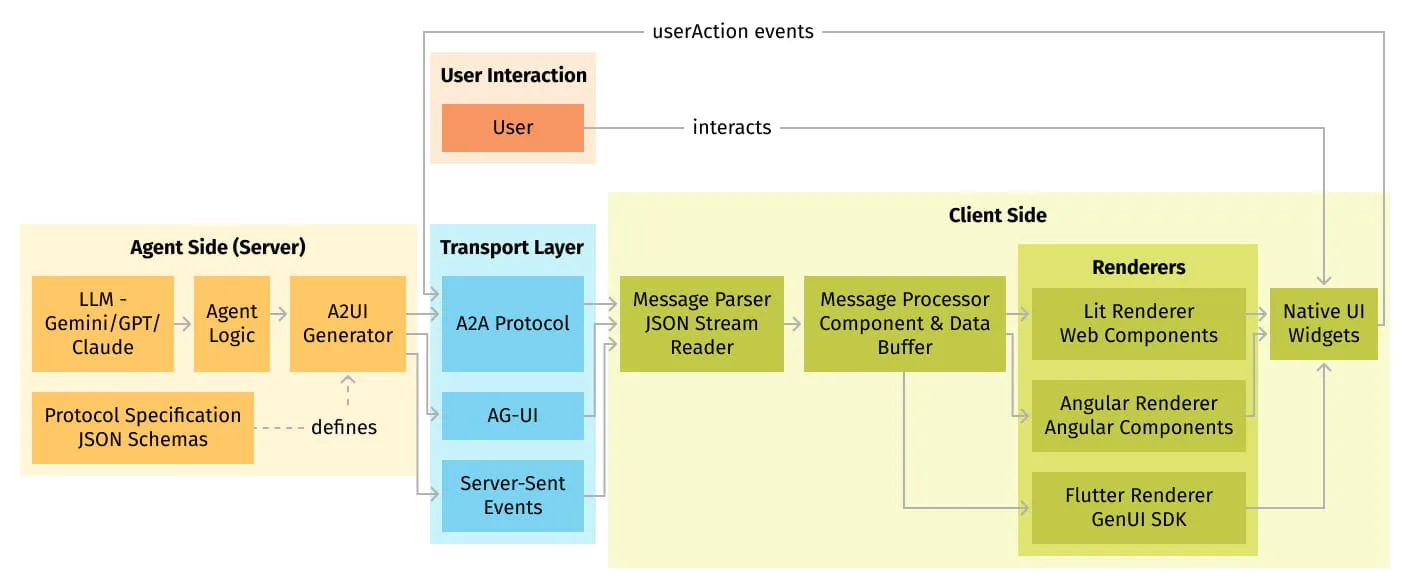
A2UI decouples UI generation from UI execution through a strict separation of concerns. An agent sends a declarative description of components and their relationships as JSON. The client application maintains a catalog of trusted, pre-approved UI components, things like buttons, text fields, cards, and lists, and maps the agent’s abstract descriptions to concrete native widgets.
This sets up a contract between agent and client. The agent says “render a card containing a title and two buttons.” The client decides whether that becomes a Flutter widget, a Lit web component, or an Angular directive. The same A2UI payload renders across different platforms and frameworks without modification.
That separation handles three concerns:
- Security: No executable code crosses trust boundaries. Agents cannot inject JavaScript, HTML, or other executable content.
- Portability: One JSON payload renders on any supported platform.
- Control: Clients own their UI implementation and maintain brand consistency regardless of what agents request.
The design trade-offs
A2UI makes deliberate trade-offs, and understanding them helps you decide if it fits your use case.
- Security over pixel-perfect control: Agents can only request pre-approved components and send semantic hints (like usageHint: “h1”) rather than exact styling. You lose design precision but gain security and cross-platform portability.
- LLM-friendly over schema-elegant: Flat adjacency lists because LLMs generate them more reliably than nested trees. The client reconstructs the tree, trading wire simplicity for client complexity.
- Framework-agnostic over opinionated: Styling, animation, and platform behavior remain client responsibilities. Each platform implements its own widget mappings.
- Progressive rendering over complete payloads: Streaming enables fast perceived performance, but requires client-side buffering and handling of incomplete component trees.
What A2UI explicitly avoids is also telling: authentication, state persistence beyond the session, complex client computation, transport specification, and styling or design tokens. The protocol stays focused on one thing, safely describing UI intent, and leaves everything else to other layers of your stack.
Under the hood
A2UI uses a unidirectional stream of JSON messages from server to client, with user events traveling back through a separate channel. The client parses each message incrementally, building or updating the UI progressively as data arrives. Messages are identified by the MIME type application/json+a2ui.
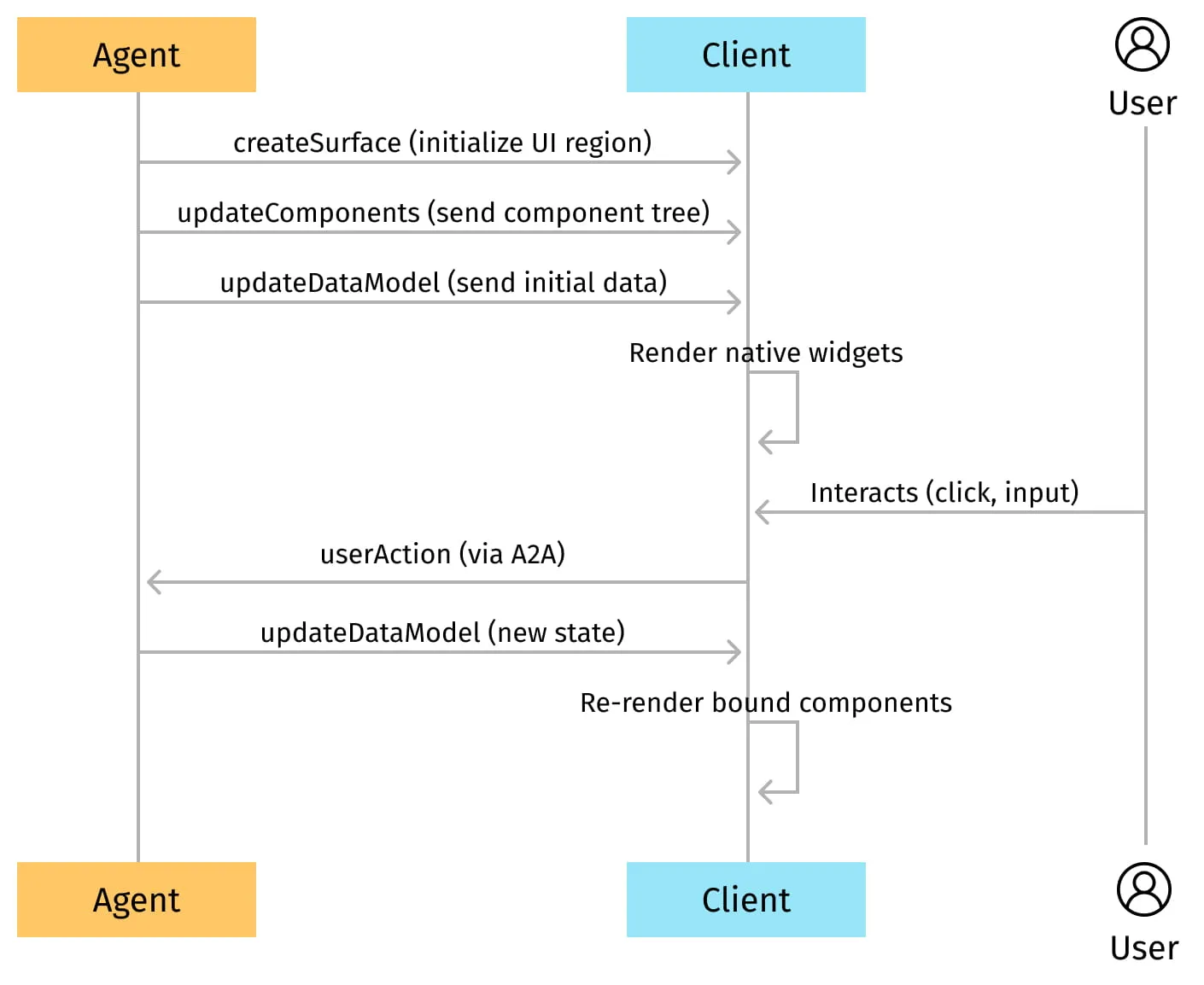
The details below describe the v0.9 protocol structure. If you’re using v0.8, the current public preview, note that it uses beginRendering and surfaceUpdate instead of createSurface and updateComponents.
Message types
The protocol defines four server-to-client message types:
| Message | Purpose |
| createSurface | Initialize a new UI region with a specific component catalog |
| updateComponents | Add or update component definitions as a flat list |
| updateDataModel | Modify the data that components display |
| deleteSurface | Remove a UI region |
Architecture layers

The protocol strictly separates three concerns. The component tree defines UI structure, transmitted as a flat adjacency list with ID references defining parent-child relationships. Flat lists are intentional. LLMs generate them more reliably than nested trees, and the structure enables progressive rendering since components can arrive in any order.
The data model holds the application state as JSON per surface. Components bind to data paths using JSON Pointers like /user/profile/name, and updates to the data model automatically reflect in bound components without resending the entire UI structure.
The component catalog is a JSON Schema defining available component types and their properties. It acts as the shared contract between agent and client, with the server referencing it by URI. The widget registry is the client-side counterpart: a runtime mapping of catalog types to native implementations that determines how abstract components become concrete widgets.
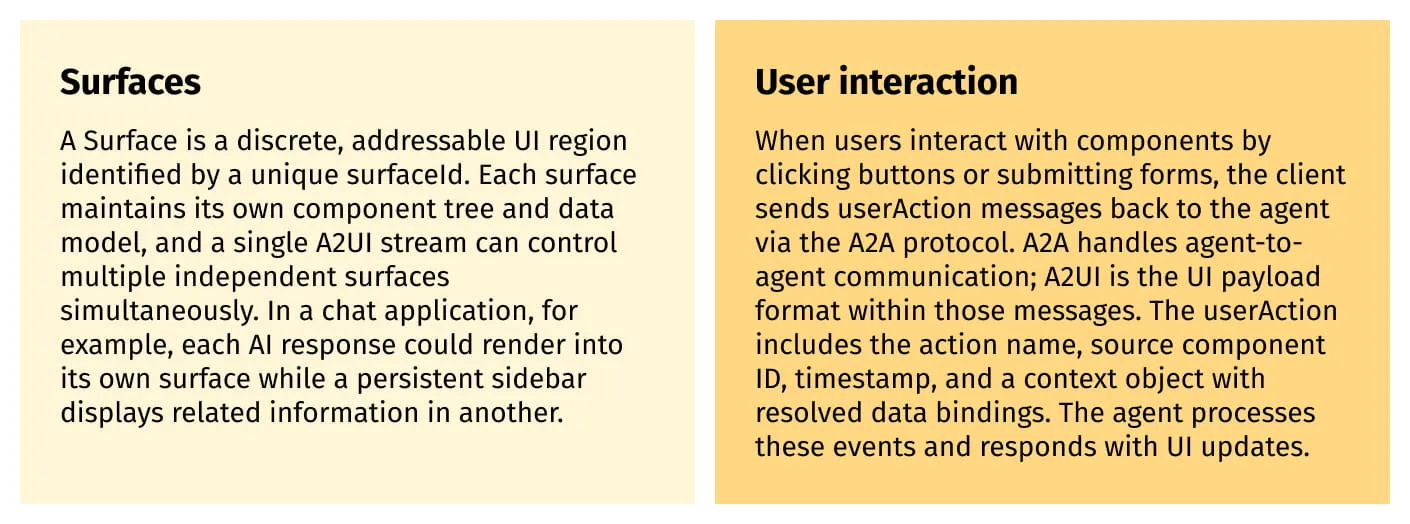
This separation keeps the UI stream unidirectional while enabling full bidirectional interaction through a distinct event channel. A2UI and A2A are complementary but independent; you could use A2UI over other transports if needed.
Data binding
A2UI separates UI structure from dynamic state through a binding system. Component properties accept either literal values or path references into the data model. In v0.9, this looks straightforward:
{"text": "Welcome"}                      // literal value (v0.9)
{"text": {"path": "/user/name"}}         // binds to data model path (v0.9)
Version 0.8 uses a different syntax with explicit literalString wrappers, so check which version you’re targeting.
Interactive components like TextField support client-side two-way binding, where user input updates the local data model immediately. These changes remain client-side until a userAction triggers submission to the agent, which reduces network overhead and keeps form interactions responsive.
For list rendering, container components create child scopes. A List bound to /employees with a template component creates a new scope for each item. Within that scope, relative paths like name resolve to the current item’s properties, while absolute paths starting with / still reference the root data model.
The security model
A2UI treats all external agents as potentially malicious, and the security model reflects that assumption. It operates on three principles:
- Declarative data format: Messages are pure JSON conforming to defined schemas. No executable code, no JavaScript, no HTML injection vectors.
- Component catalog whitelisting: Agents can only request components in the client’s pre-approved catalog. Unknown types get rejected.
- Schema validation: Every message validates against JSON schemas before processing. Invalid payloads are rejected with structured error feedback that enables LLM self-correction.
There’s a key limitation: A2UI validates message structure, not agent identity. Authentication and authorization are explicitly out of scope. The rendering layer adds additional protection since frameworks like Lit and Angular automatically sanitize interpolated values, but client developers remain responsible for configuring Content Security Policy headers and secure transport.
The v0.9 shift
A2UI v0.8 is the current public preview, and v0.9 is in development with a significant philosophical shift: from “Structured Output First” to “Prompt First.”
Version 0.8 used strict JSON structures with explicit typing, optimized for LLMs that support JSON mode or function calling. The problem was that LLMs struggled to generate it consistently. Version 0.9 embeds directly in an LLM’s system prompt, with schemas refactored to be more human-readable and token-efficient. It prioritizes patterns that LLMs naturally excel at, like standard JSON objects for maps.
The trade-off: v0.9 enables richer, more expressive component catalogs since you’re no longer limited by structured output constraints, but it requires a “prompt-generate-validate” feedback loop with post-generation validation. The result is that LLMs generate compliant payloads more reliably, with fewer retries.
When to use A2UI
What’s next?
The project roadmap includes:
- Spec stabilization: Moving toward v1.0 with stable message formats and catalog definitions.
- Additional renderers: Lit, Angular, and Flutter exist today. React, Jetpack Compose, and SwiftUI are planned.
- More transports: REST support and channels beyond A2A.
- Framework integrations: Genkit, LangGraph, and other agent development frameworks.
A2UI exists to address a gap in multi-agent architectures: the need for standardized, safe UI payload exchange across trust boundaries.
What this means in practice
The agentic UI space is evolving fast, with MCP-UI, AG-UI, and A2UI representing different bets on how agents should communicate UI intent.
A2UI’s bet is native-first, cross-platform declarative payloads. No iframe sandboxing, no code generation, no web-only constraints. One JSON blueprint renders as Flutter widgets, Lit web components, or Angular directives, with more renderers coming.
If you’re building multi-agent systems that span platforms and care about secure AI agent UI design, A2UI is worth exploring. The protocol is Apache 2.0 licensed and welcomes contributions. What approach are you using for agent-generated UIs today?
A2UI is an open-source project from Google. v0.8 is the current public preview; v0.9 is in development. Repository: github.com/google/A2UI
Interested in this topic?
Authors
You might also like